Paira: features that fail safe, from the database to the phone
Paira is a double-dating app in Detroit. Singles meet in groups of four at partner venues around the city. Since September 2026 I've worked with its small team as a Forward Deployed Full Stack Design Engineer, taking features from a brief to production across the mobile app, the partner portal and the database. This page covers four of them, and the rule they share.
The job
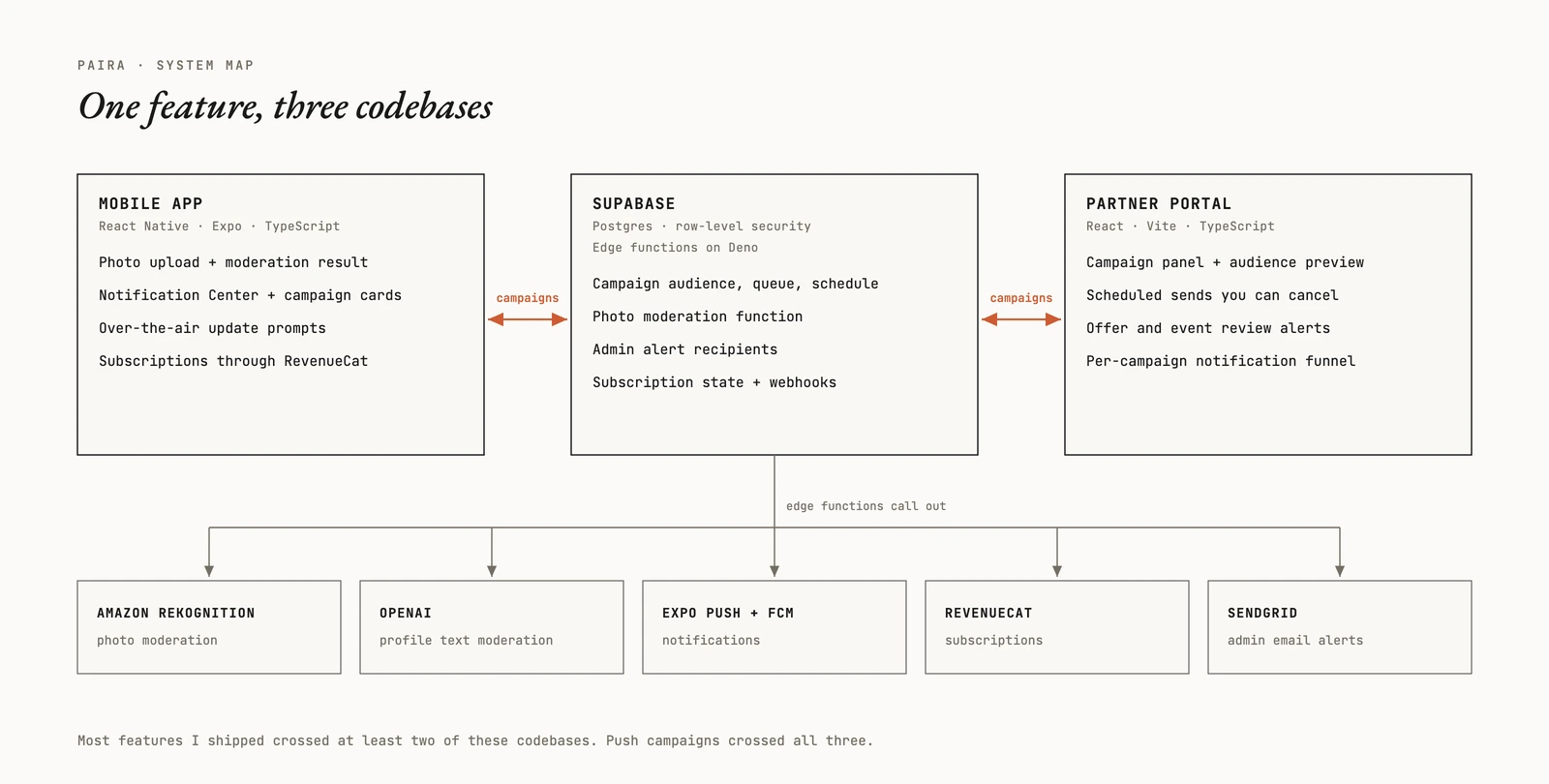
Forward deployed means I work inside someone else's product. At Paira that's three codebases: a React Native app built with Expo, a partner portal in React, and a Supabase backend with Postgres and edge functions that run on Deno. A feature usually needs all of them. The schema and the migration, the function that does the work, the screen in the portal, the screen in the app, the tests, and the runbook for whoever looks after it next.
I design and I build, so the wording on a screen and the code behind it often come from the same hands. On a small team, that saves handoffs.
One rule ties the work together. When the system fails, the member shouldn't pay for it.
Photos: only a policy decision removes one
A dating app has to screen every photo before strangers see it. Paira's photos go through Amazon Rekognition, and profile text goes to a separate text model. I built the photo side: a format check that reads the real bytes instead of trusting the file name, the call to Rekognition with a timeout and one retry, and a router that turns its labels into a decision.
The labels weren't the hard part. The failure paths were. A moderation service times out. A credential expires. A phone sends a HEIC file named .jpg. A simple pipeline treats every one of those as a bad photo, and bad photos get deleted. So I split the outcomes by whose fault they are.
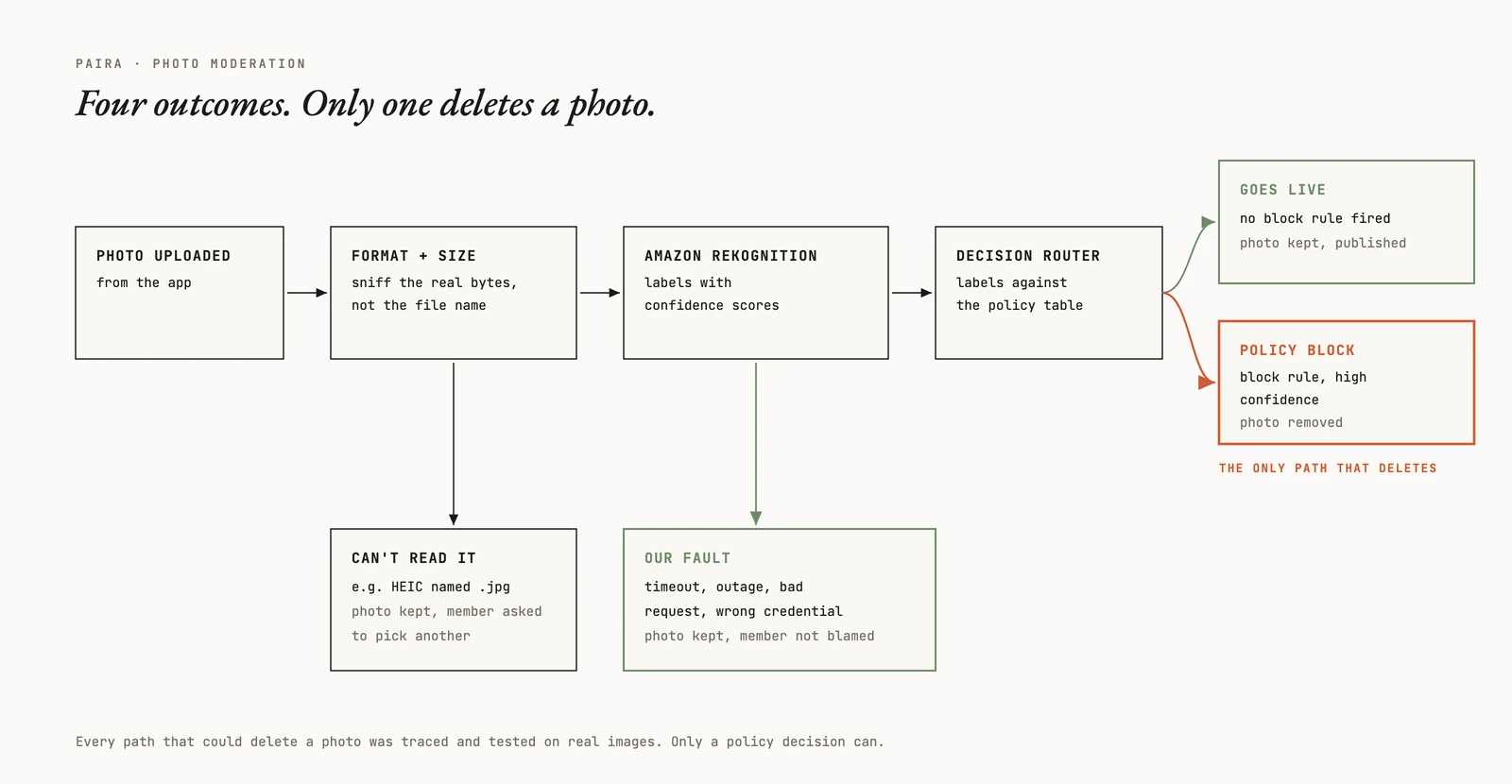
Then I tried to break it. I traced every path that could delete a photo, built a test set of real images for each policy category, and ran the flow on devices instead of trusting the test harness alone. The feature comes with a production runbook: how to roll it out, what to check after, and how to roll it back.
Push campaigns you can't take back
Paira's team wanted to reach members directly: a new venue, an event this weekend, an offer from a partner. That's a push campaign, and pushes have one property that shapes everything. Once one is sent, it can't be recalled.
So everything you can undo happens before the send. In the portal, an admin picks a campaign type and a destination from a fixed list, never a raw link. The audience is limited to cities Paira has launched in, and the portal shows exactly who matches before anyone presses send. Sends can go out now or on a schedule, and a scheduled one can be cancelled until it leaves. Production campaigns sit behind their own switch, off by default.
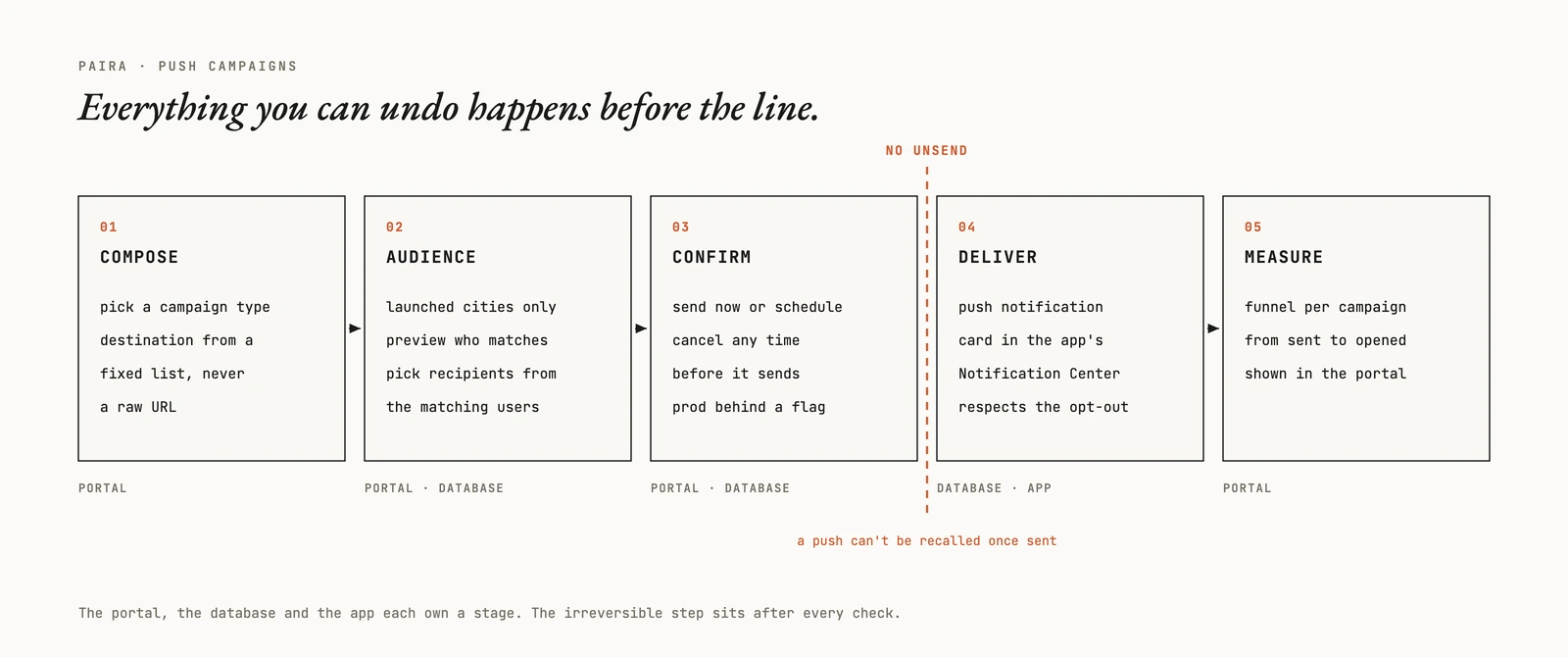
On the phone, a campaign arrives as a push and as a card in the app's Notification Center. Members who switch off Paira Recommendations in settings don't get them. Back in the portal, every campaign has its own funnel, from sent to opened. The system has been live since October.
Updates nobody gets stuck on
Expo lets a team ship app changes over the air, without waiting for a store release. The catch is that a downloaded update does nothing until the app restarts, and people rarely restart apps. I built the prompt in two tiers. Most updates show a banner: apply now, or dismiss it and keep going. An update the app can't run without gets a full-screen restart instead.
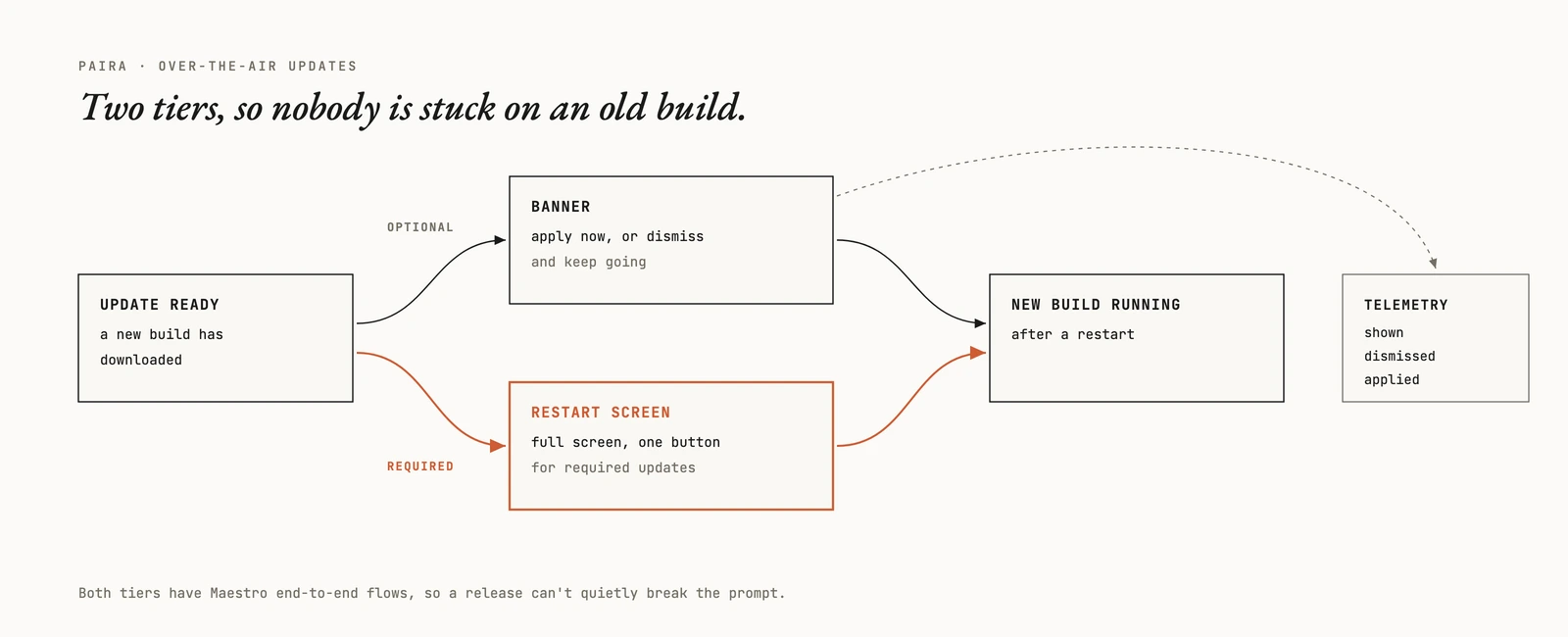
The app records when the banner is shown, dismissed and applied, so the team can see whether people actually move to the new build. Both tiers have Maestro end-to-end flows. That matters for a prompt that only appears after a release, which is exactly when nobody is looking at it.
The unglamorous half
Some of the work is plumbing nobody notices until it's wrong. I got the Android build installing cleanly, wired push notifications through Firebase Cloud Messaging, and made the store wording right on each platform.
On subscriptions, the app now refuses to start RevenueCat with a key meant for the other platform. I also built expiry handling that respects billing grace periods, so a card that fails once doesn't cut a member off on the spot, and wrote the reconciliation runbook that goes with it. And I built the emails that tell the team when a partner offer or a venue application needs review.
How I work in a codebase that isn't mine
A few habits did most of the work.
- Check the real system. A fixture I wrote is a second copy of my own assumptions. The bugs that mattered showed up when I queried live data.
- Break my own tests. A green suite proves nothing until I change the behaviour on purpose and watch a test fail.
- Ship the docs with the code. Every feature here has a guide and a runbook, written for whoever is on call.
- Use the team's process. Every change goes through their pull requests, reviews and CI.
The stack: React Native, Expo and TypeScript in the app. React and Vite in the portal. Supabase for Postgres, row-level security and edge functions. Amazon Rekognition for photos, RevenueCat for subscriptions, Expo push with FCM for notifications, SendGrid for email. Maestro, Jest, Vitest and Deno's test runner for tests, with Git, GitHub and CI around all of it.
Where it stands
The work is ongoing. This page sticks to what I built and how, and keeps Paira's internal numbers out of it. joinpaira.com ↗
If your team is small and your backlog runs across the app, the backend and the design, that's the work I like most. What's the feature you keep putting off? Tell me about it →